What is Abora OS?
A NixOS-based distro that makes the start less rough.
Abora OS v4.1 Horizon is the current stable release: five edition ISOs, 23 desktop profiles, ANIX v2, GPU driver selection, and an installer that can use an existing partition, with a built-in partition editor and clear explanations when an install fails. The Edge channel follows newer work as it lands.
Why Choose Abora?
- ✓
Reproducible Systems
Your entire system is defined in one configuration file. Version control it, share it, deploy to any machine. Every system ends up identical.
- ✓
Atomic Upgrades & Instant Rollbacks
Updates are atomic. If something breaks, rollback instantly. Your previous system is always one boot away.
- ✓
Desktop choice
Choose GNOME, KDE Plasma, Hyprland, COSMIC, Openbox, Qtile, and other profiles. Change later without reinstalling.
- ✓
Simple & Powerful
Simple commands with ANIX for everyday tasks. Full NixOS power when you need it.
- ✓
Guided Installer
Terminal-first but keyboard-driven. Choose your preferences before touching the disk.
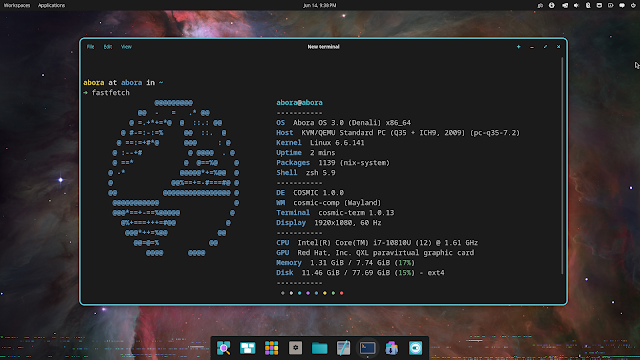
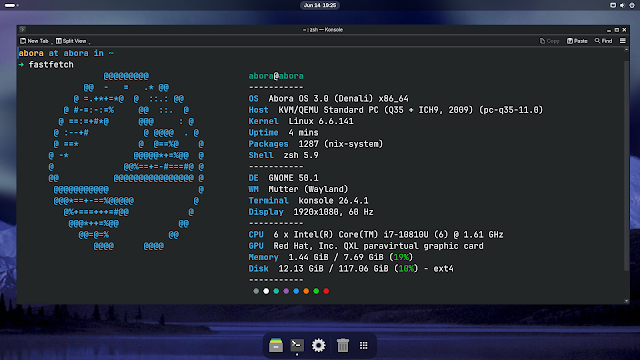
See Abora in Action
Desktop environments right out of the box. Choose a profile during installation and switch later when needed.
Open Source & Community
Abora OS is completely free and open source, licensed under GPL-3.0, OSPL, and FSPL by Xeno Tech, an umbrella brand organizing projects by AnimatedGTVR. Join our Discord community to get help, share setups, and contribute.
What Abora Changes
| NixOS | A blank live system | → | A cleaner boot and welcome flow |
| Manual setup right away | |||
| → A guided terminal installer | |||
| One main desktop path | |||
| → 23 desktop/window-manager choices | |||
| Long rebuild commands | |||
| → Shorter `anix` and update commands | |||
| A plain first boot | |||
| → Wallpapers, themes, apps, and branding | |||
| Recovery you have to figure out | |||
| → Snapshots, rollback helpers, and repair tools | |||
Key Features
Guided Installer
Terminal-driven keyboard navigation. Choose locale, desktop, apps, and user settings before installation begins.
23 Desktop Environments
Full DEs, Wayland compositors, tiling window managers, lightweight options, and console-only installs.
ANIX v2 Tools
Profiles, snapshots, diffs, rollbacks, and system management, now with pluggable ANIX, MKO, and ModuCPP configuration languages.
TinyPM v4
Simplified package management. Works with Nix, Flatpak, and other package managers.
Recovery Tools
System doctor, rollback helpers, snapshot management, and repair workflows.
App Bundles
Curated starter app collections for different use cases: Creator, Developer, Gaming, etc.
Next Steps
Ready to try Abora? Head over to the Installation guide to get started.